





Update 2013-02-08: It seems that this error is triggered by many different conditions. If you have my problem, the following steps may help you. If not, please don’t post “this didn’t help, any ideas?” I cannot help you further. If you have new information to add, please do post a comment!
Recently Google offered a sale on 10 Android apps each day for 10p (or 10¢). During the sale I bought a number of apps, because 10p is practically indistinguishable from “free”. Unfortunately, my bank believed this large number of sub-one-pound purchases to be fraudulent. Normally they’d be right; that’s exactly the kind of thing criminal organisations do when testing credit cards. But in my case, it was just a case of “SALE! SALE! SALE!” madness.
I cleared it with the bank, but after that I could no longer buy applications through the Android Market application. When I attempted to do so, the Market required me to check “I agree to the Payments for Android
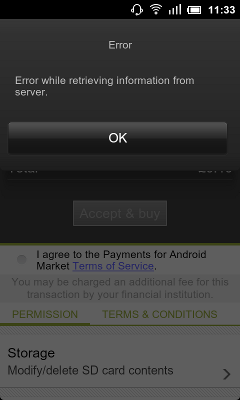
Market Terms and Conditions”, then failed with the message “Error while retrieving information from server.”
If you don’t care to read the grimy details, perhaps you should skip to the solution.
I reported the issue to Android Market technical support, who replied to me the following day requesting steps to reproduce. I gave them a full bug report:
- Open Market.
- Navigate to any app. Press the amount button, such as “£0.10”, button on the upper right.
- The confirmation page loads, listing my credit card, gmail account, and total. “Accept & Buy” is grey, and the statement “I agree to the Payments for Android Market Terms and Conditions” is displayed, unchecked.
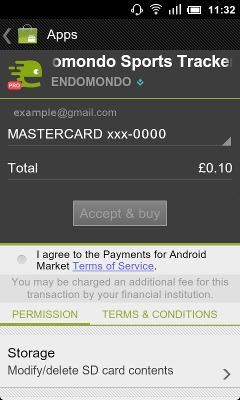
- Check next to “I agree …”. “Accept & Buy” becomes blue.
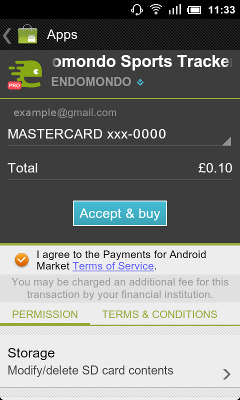
- Press “Accept & Buy”.
- The error message “Error while retrieving information from server” appears.
What immediately stood out is that I had never previously seen “I agree to the Payments for Android Market Terms and Conditions” appear during a purchase. The Market normally prompts you to accept this the first time you run it after factory reset. My wife’s phone did not have this message.
Also of interest, I could purchase Android apps through the Android Market website, and send them to the device (or install them via the Market). The problem was only with purchases made via the Market app.
I provided all these details, including the fraud problem to Android Market technical support. Unfortunately, I also identified my devices as running community-build Android ROMs. My HTC Desire HD phone runs MIUI, and my Nook Color tablet runs CyanogenMod. That caused another day of delay while technical support insisted that they could not help me because “unauthorized operating systems (custom ROMs) may have limited functionality due to the compatibility of the device.”
I asked technical support to check that my Market account is functioning normally, and they responded with “I’ve taken another look at your account, and can find no reason you shouldn’t be able to access Android Market. Please remember that Android Market may not work well with devices in a modified state as far as operating system or user access privileges. I can only recommend using Android Market with your device in its factory default state.”
I did not expect technical support to support a modified ROM. And before anyone accuses them of refusing to help for that reason, they did not blame the ROM outright and they did try to help. However, they did not solve the problem.
So I spent another day testing. I purged Market settings from /data/data/com.android.vending. I compared to friends’ devices. I arranged to borrow a stock, unmodified phone from a friend and test the following day. And then I realised something – my wife’s phone showed a different credit card number in the purchase screen. We have the same joint account and credit card number, which means that she was able to make purchases with a different credit card.
I logged in to Google Wallet and deleted my credit card, and added it again. The problem was immediately solved. The Market no longer displayed “I agree to the Payments for Android Market Terms and Conditions”, and I’ve been able to buy apps ever since.
Conclusions:
- The Android Market error message “Error while retrieving information from server” apparently means “Your credit card with Google Wallet once refused a charge”. Or at least indicates a problem with Google Wallet. This error message is totally unhelpful and should be corrected.
- If you get this error message, try logging in to Google Wallet, remove your credit card, and add it again.
- If you are running a custom ROM, Android Market technical support may pause because the ROM could be at fault. I appreciate that they did try, and they were polite and courteous the whole time. But it still sucks that they believe the CyanogenMod team is any less professional than HTC. And it especially sucks when you provide professional-quality steps-to-reproduce which clearly indicate the ROM is not the problem.
- Android Market technical support does not know about this error message or issue with Google Wallet. This is especially disconcerting, as it probably happens all the time and they are exactly the people who should know about it.
I found only a handful of references to this error via Google searches, none with solutions. So I’m writing this all up here, in hopes that it will help other people.
-
In my case it didn’t help:(
-
The Android market should batch your purchases so you don’t get marked as fraudulent in the first place. I believe Apple’s app store only charges you once per day.
-
A good idea, but that’s not what happens with the Market. Or the Amazon App Store.
-
Same case same problem….Android needs to do something…. my Market App or even the new Google play app does the same thing gives me this error while loading “Error while retrieving information from server”. This is very annoying though that they still can’t fix this blocker of a bug in their Application. I have done all kinds of resets etc. as much as you can find on the internet.
And you are right there are not many actual solutions out there, infact none I found so far. Someone please help.
By the Tablet is LG and has a 3d camera as well. The build is latest 3.1.
-
I have the same issue on a kobo – I was happily buying from google play then started to get the error – tried deleting cards, adding different ones, using a new account paying via browser rather than play, nothing worked – i’m locked out of buying – the app developers are loosing sales- maybe they should be the ones reading this and putting pressure on google?
-
I get this same message on a brand new tablet that I purchased for my grandkids and have never purchased any apps on. I have never had this problem on my samsung galaxy s2
-
Ray – did you ever get a answer to your issue – we are experiencing the same. New AGPTEK android tablet for the kids and never purchased before but now getting this message. ???
-
Same thing here on Christmas day after my granddaughter opened the android tablet I bought for her for Christmas– disappointing after such excitement with the gift. We tried to trouble shoot with all the solutions I found on line, but nothing has helped so far.
-
Same problem ;(( ” error retreiving information to the server” how to fix it ?? Anyone help .
-
how to fix it..(error retrieving information from server…anyone help..
-
Yes same issue here. What is the solution?
-
Have any of you with this problem tried logging in to Google Wallet and removing/adding your credit card as I describe above?
-
@Tyler I just did all of those, but ki luck, I still got same annoying message… any idea???
-
Here on my Sony Xperia Tipo it gives me this message:
“We were unable to verify your account information. Please visit wallet.google.com/manage in order to resolve this issue. [BM-PP2-20]
I’ve done every solution that was suggested above and the problem remains…that sucks!
-
I rarely drop responses, however after browsing through some of the remarks on Android Market:
-
We should ask the help of Samsung, Sony etc maybe one of them we’ll have more interest to back they clients than Google who makes it’s money in advertising and not selling they hardware. it is a shame the little interest Google had shown. Good lesson for future patronage.
-
guys i think i found the solution for me i guess
-
i experienced this issue when i made another account instead of xxxx@gmail.com what i made was xxxx@yahoo.com so my account was now duplicated so what i did is i delete all my accounts from google and i register my previous account xxxx@gmail.com again and after doing that google asked me about the credit card…blah blah i just check it and after that i go to play store and download any apps and it works just try that i hope it helps you..
-
pls I am having the same problem, error retrieving information from server Samsung galaxy
-
i get error retreaving infomation from server. [DF-PPA-10] anyone else get this error when trying to purchasing something?
-
-
-
-


21 comments
Comments feed for this article
Trackback link: https://www.tolaris.com/2011/12/18/android-market-error-while-retrieving-information-from-server/trackback/